

Video Tutorial
Introduction
Alter supports x-callback-url so apps can trigger actions in each other. You can:- trigger Alter actions from external apps
- trigger external app actions from Alter
- pass input data in URLs
- return back to the originating app (depending on app support)
How It Works
- Trigger Alter actions from another app via
alter://...URLs. - Trigger external app actions from Alter using that app’s URL scheme.
Trigger Alter Actions From External Apps
- Open Action Editor.
- Select an action.
- In
General, copy the URL from the URL Callback section. - Paste the URL into another app (browser, notes, shortcuts, etc.).
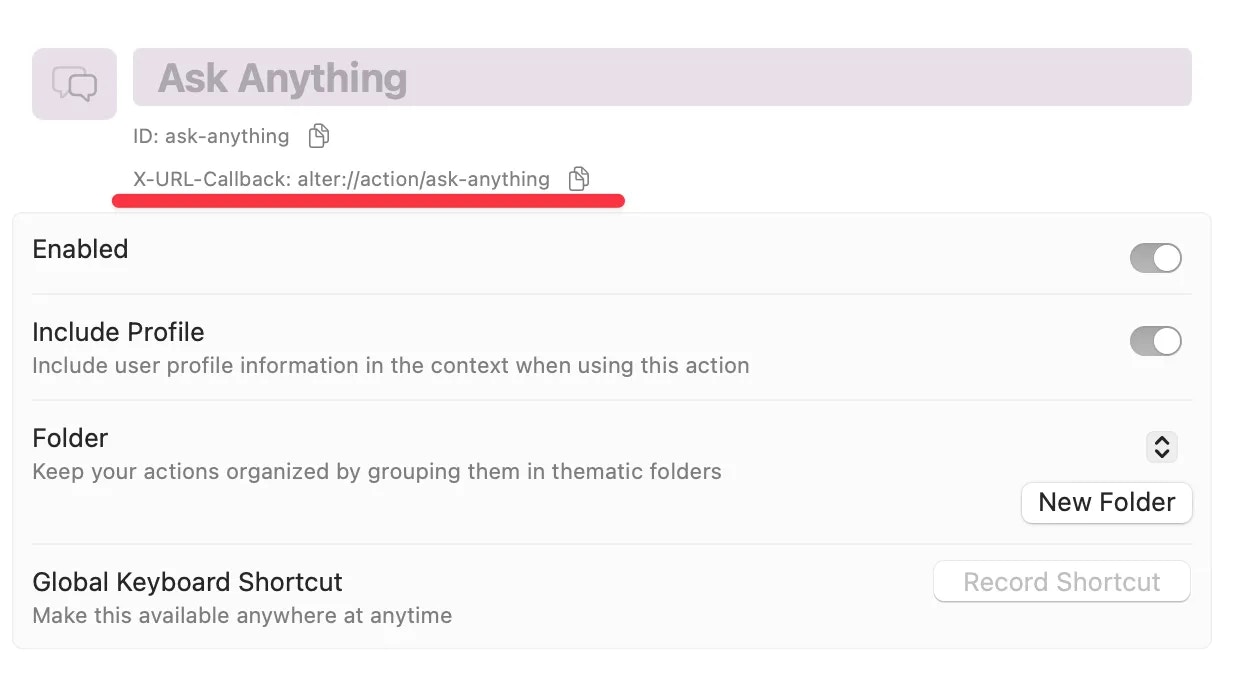
Trigger External App Actions From Alter
- Create a clickable URL in Alter using the target app scheme.
- Format parameters exactly as required by that app.
- Click to run and verify action behavior.
Examples
Alter callback examples
-
Search query:
alter://action/ask-web?input=What+is+Alter+MacOS- alter://action/ask-web?input=What+is+Alter+MacOS
-
Business strategist without input:
alter://action/business-strategist-gpt- alter://action/business-strategist-gpt
-
Business strategist with input:
alter://action/business-strategist-gpt?input=Explain+Red+Ocean+Strategy- alter://action/business-strategist-gpt?input=Explain+Red+Ocean+Strategy
Cross-app example
- Bear note creation:
bear://x-callback-url/create?title=Demo%20Note
Supported Apps (Sampling)
Apps with x-callback-url or URL-scheme support include:- 1Writer
- 2Do
- Agenda
- Appigo Todo
- Bear
- Begin
- breadwallet
- Byword
- Cal2Todo
- ClouDrop
- Command-C
- Daedalus Touch
- Daymate
- Definition
- DEVONThink
- Dispatch
- Drafts
- Due
- Editorial
- Equipd Bible
- Fantastical
- Gladys
- Google Chrome
- Google Maps
- Hook
- iCab Mobile
- Instapaper
- iPGMail
- iZettle
- Kippster for Kippt
- Launch Center Pro
- miCal
- Missives
- Multitimer
- MyDoorOpener
- Notesy
- OmniFocus
- Opener
- Otto’s Remote
- Overcast
- Pleco
- Poster
- Prizmo
- Procraster
- RollPG
- RunJavascript
- Scanner Go
- Shopi
- Showrtpath Browser
- Silo
- Shortcuts
- Story Planner
- Streets
- Terminology
- TextCenter
- TextExpander Touch
- Textastic
- Textkraft
- TextTool
- Things
- Timepage
- Trello
- Tumblr for iOS
- Ulysses
- UpwardNotes
- VideoLAN
- Waterminder
- Where To?
- Working Copy
Testing And Troubleshooting
- Verify the URL scheme and parameters.
- URL-encode special characters.
- Confirm the target app supports the action.
- Paste the app’s callback documentation URL into Alter to ground syntax/rules.