

Alter connects to Telegram with a bot token from @BotFather. Alter uses long polling on your Mac — you do not configure webhooks or a public URL.
开始之前
- 一个Telegram帐户。
- Alter 在您的 Mac 上安装并运行。
- Telegram应用程序或Telegram Web。
- @BotFather 于 Telegram
- Telegram Bots — Features and BotFather
- Telegram Bot API tutorial
- Bot FAQ — groups and privacy
步骤 1 — 使用 BotFather 创建一个机器人
1
Open BotFather

2
Run /newbot
Send 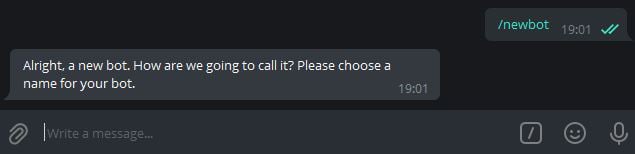

/newbot. BotFather asks for a display name (shown in contacts) and a username (must end in bot, for example MyAlterHelperBot).3
Copy the HTTP API token
When creation succeeds, BotFather sends a message containing your token (format like 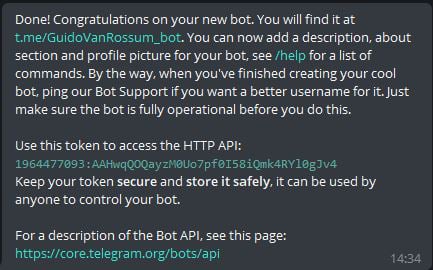
123456789:ABCdefGHIjklMNOpqrsTUVwxyz). Copy the full string.Telegram documents this flow in the Bot tutorial — Obtain your bot token.可选BotFather设置
第 2 步 — 开始与您的机器人聊天
1
Open the bot
Tap the link BotFather provides (for example
t.me/YourBotName) or search for your bot’s username in Telegram. The success message in Step 1 includes this link.2
Tap Start
Send
/start so Telegram opens a conversation. You need an active chat before testing Alter.步骤 3 — 可选:在组中使用机器人
Alter可以接收群聊和私聊的消息。1
Add the bot to a group
In your group, add the bot as a member (you may need admin permission to add bots).
2
Check Group Privacy (if messages are missing)
By default, Telegram bots in groups may only see commands and @mentions. For broader group access, open @BotFather →
/mybots → your bot → Bot Settings → Group Privacy → Turn off.See Bot FAQ — privacy mode.3
Restrict access if needed
If the bot should only respond to certain people or groups, see Secure access — allowlists and IDs below and fill in 允许的 Telegram 使用者或聊天 ID when you connect Alter.
安全访问 — 允许名单和 ID
限制谁可以使用您的Telegram网关与設定 → 集成 → Gateways中的允许的 Telegram 使用者或聊天 ID。 Alter 在运行操作之前检查每个传入消息和内联按钮点击该列表。Alter matches user IDs, chat IDs, and
@usernames (case-insensitive). Leave the field empty to allow anyone who can message the bot. Enter * to allow everyone explicitly. Messages from users or chats not on the list are silently ignored — Alter does not reply with an error.用户 ID 与聊天 ID
Telegram 对人和对话都使用数字 ID:
在与您的机器人的 private chat 中,聊天 ID 通常与您的用户 ID 相同。在 group 中,如果您希望允许该群组中的每个人都被允许(取决于 Group Privacy 设置),请添加该群组的聊天 ID。
如果此人具有公共用户名,则 Alter 还接受
@username 值(例如 @sam)。
如何找到您的Telegram用户ID
1
Use an ID bot (easiest)
In Telegram, open @userinfobot or @getidsbot and tap Start. The bot replies with your numeric Id — that is your user ID.Copy the number (digits only, no
@) into 允许的 Telegram 使用者或聊天 ID.2
Forward a message (groups or other chats)
To identify someone else, forward one of their messages to @userinfobot or @getidsbot. The bot reports the sender’s user ID.
如何查找聊天ID
1
Private chat with your bot
Your user ID from Step 1 above is usually enough — private chat IDs match the user’s ID.To confirm, message your bot, then call Telegram’s
getUpdates method with your bot token and look for "chat": {"id": …} and "from": {"id": …} in the JSON. See Telegram Bot API — Chat and User.2
Group or supergroup
Add @getidsbot to the group temporarily (or use @RawDataBot), send any message in the group, and copy the Chat ID from the bot’s reply. Group IDs are negative numbers.Remove the ID bot from the group when you are done if you do not need it there permanently.
3
Bot API getUpdates (no extra bots)
With your bot token, open this URL in a browser (replace
TOKEN with your token):https://api.telegram.org/botTOKEN/getUpdatesSend a test message in the chat you want to identify, refresh the page, and read message.chat.id (chat ID) and message.from.id (sender user ID) from the latest entry.在Alter中配置白名单
1
Collect IDs
Gather comma-separated user IDs, chat IDs, and/or
@usernames for everyone (or every group) that should be able to use the bot.2
Paste into Gateways settings
Open 設定 → 集成 → Gateways, edit your Telegram gateway, and enter the values in 允许的 Telegram 使用者或聊天 ID (for example
123456789, -1001234567890, @sam).3
Save and test
Click 保存并重启. Message the bot from an allowed account or group — you should get a reply. Messages from IDs not on the list are ignored with no response.
安全最佳实践
- Treat the bot token like a password. 仅将其存储在Alter (Keychain) 中。如果泄漏,请使用
/revoke在@BotFather中撤销它,并将新令牌粘贴到Alter中。 - Use an allowlist for personal bots. 空白名单意味着发现您的机器人的任何人都可以在 Alter 运行时向其发送消息。
- Prefer numeric IDs over
@username. 用户名可以更改;数字 ID 是稳定的。 - Limit group exposure. 在BotFather 中打开Group Privacy,除非机器人必须读取所有群组消息。仅添加受信任的群组,如果机器人位于多个群组中,则将群组聊天 ID 列入白名单。
- Be cautious with third-party ID bots. 他们可以查看转发的消息和组元数据。当您不再需要它们时,将它们从敏感组中删除。
连接Alter
1
Open Gateways settings
Open 设置 (⌘,) → 集成 → Gateways.
2
Add a Telegram gateway
Click 添加 Gateway → Telegram.
3
Fill in Connection fields
4
Choose 默认 Action
Ask Anything 是默认 Action,在 Telegram 上开箱即用。对于自定义 Action,在 Action Editor → Gateways 中将 可用性 设为 Telegram 或 全部。
5
Enable and save
Turn 已启用 on, then click 保存并重启. Wait for 已连接为 @your_bot_username.
测试机器人
1
Confirm Alter is running
Gateways only work while Alter is open on your Mac.
2
Send /help
In your Telegram chat with the bot, send
/help. The bot should list commands.3
Send a message
Send a normal message. Alter should show Thinking…, then stream the reply. In private chats, Alter uses Telegram’s native draft preview when available; otherwise it edits a regular message (rich replies can be up to about 32,000 characters).
4
Try buttons and /stop
Send
/help and use the New chat, Choose action, or Past chats buttons. While Alter is responding in a group, tap Stop or send /stop to cancel the current turn.5
Try attachments
Send a photo or document. Alter downloads supported attachments for the turn and can upload output files from tool runs when the action produces them.
6
Try voice messages
Send a voice message or audio file. Alter transcribes it with your selected voice processor (设置 → Voice) and sends the text to the active action. Audio-only messages work as chat turns even without typed text.