

Alter connects to Telegram with a bot token from @BotFather. Alter uses long polling on your Mac — you do not configure webhooks or a public URL.
Antes de começar
- Uma conta Telegram.
- Alter instalado e em execução no seu Mac.
- O aplicativo Telegram ou Telegram Web.
- @BotFather em Telegram
- Telegram Bots — Features and BotFather
- Telegram Bot API tutorial
- Bot FAQ — groups and privacy
Passo 1 — Crie um bot com BotFather
1
Open BotFather

2
Run /newbot
Send 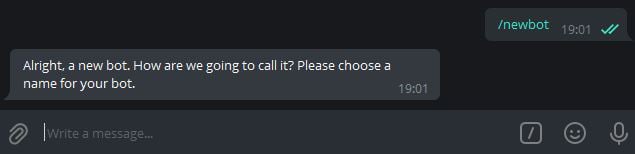

/newbot. BotFather asks for a display name (shown in contacts) and a username (must end in bot, for example MyAlterHelperBot).3
Copy the HTTP API token
When creation succeeds, BotFather sends a message containing your token (format like 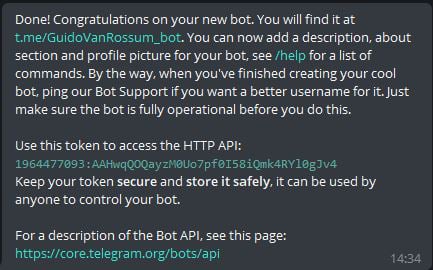
123456789:ABCdefGHIjklMNOpqrsTUVwxyz). Copy the full string.Telegram documents this flow in the Bot tutorial — Obtain your bot token.Configurações opcionais do BotFather
Etapa 2 — Inicie um bate-papo com seu bot
1
Open the bot
Tap the link BotFather provides (for example
t.me/YourBotName) or search for your bot’s username in Telegram. The success message in Step 1 includes this link.2
Tap Start
Send
/start so Telegram opens a conversation. You need an active chat before testing Alter.Passo 3 — Opcional: use o bot em grupo
Alter pode receber mensagens de bate-papos em grupo e também de bate-papos privados.1
Add the bot to a group
In your group, add the bot as a member (you may need admin permission to add bots).
2
Check Group Privacy (if messages are missing)
By default, Telegram bots in groups may only see commands and @mentions. For broader group access, open @BotFather →
/mybots → your bot → Bot Settings → Group Privacy → Turn off.See Bot FAQ — privacy mode.3
Restrict access if needed
If the bot should only respond to certain people or groups, see Secure access — allowlists and IDs below and fill in IDs de utilizador ou chat Telegram permitidos when you connect Alter.
Acesso seguro — listas de permissões e IDs
Restrinja quem pode usar seu gateway Telegram com IDs de utilizador ou chat Telegram permitidos em Definições → Integrations → Gateways. Alter verifica cada mensagem recebida e toque no botão embutido nessa lista antes de executar uma ação.Alter matches user IDs, chat IDs, and
@usernames (case-insensitive). Leave the field empty to allow anyone who can message the bot. Enter * to allow everyone explicitly. Messages from users or chats not on the list are silently ignored — Alter does not reply with an error.ID do usuário x ID do bate-papo
Telegram usa IDs numéricos para pessoas e conversas:
Em um private chat com seu bot, o ID do chat geralmente é igual ao seu ID de usuário. Em um group, adicione o ID de bate-papo do grupo se desejar que todos nesse grupo tenham permissão (sujeito às configurações de Group Privacy).
Alter também aceita valores
@username (por exemplo @sam) se a pessoa tiver um nome de usuário público.
Como encontrar seu ID de usuário Telegram
1
Use an ID bot (easiest)
In Telegram, open @userinfobot or @getidsbot and tap Start. The bot replies with your numeric Id — that is your user ID.Copy the number (digits only, no
@) into IDs de utilizador ou chat Telegram permitidos.2
Forward a message (groups or other chats)
To identify someone else, forward one of their messages to @userinfobot or @getidsbot. The bot reports the sender’s user ID.
Como encontrar um ID de bate-papo
1
Private chat with your bot
Your user ID from Step 1 above is usually enough — private chat IDs match the user’s ID.To confirm, message your bot, then call Telegram’s
getUpdates method with your bot token and look for "chat": {"id": …} and "from": {"id": …} in the JSON. See Telegram Bot API — Chat and User.2
Group or supergroup
Add @getidsbot to the group temporarily (or use @RawDataBot), send any message in the group, and copy the Chat ID from the bot’s reply. Group IDs are negative numbers.Remove the ID bot from the group when you are done if you do not need it there permanently.
3
Bot API getUpdates (no extra bots)
With your bot token, open this URL in a browser (replace
TOKEN with your token):https://api.telegram.org/botTOKEN/getUpdatesSend a test message in the chat you want to identify, refresh the page, and read message.chat.id (chat ID) and message.from.id (sender user ID) from the latest entry.Configure a lista de permissões em Alter
1
Collect IDs
Gather comma-separated user IDs, chat IDs, and/or
@usernames for everyone (or every group) that should be able to use the bot.2
Paste into Gateways settings
Open Definições → Integrations → Gateways, edit your Telegram gateway, and enter the values in IDs de utilizador ou chat Telegram permitidos (for example
123456789, -1001234567890, @sam).3
Save and test
Click Guardar e reiniciar. Message the bot from an allowed account or group — you should get a reply. Messages from IDs not on the list are ignored with no response.
Melhores práticas de segurança
- Treat the bot token like a password. Armazene-o apenas em Alter (Keychain). Se vazar, revogue-o em @BotFather com
/revokee cole o novo token em Alter. - Use an allowlist for personal bots. Uma lista de permissões vazia significa que qualquer pessoa que descobrir seu bot poderá enviar mensagens enquanto Alter estiver em execução.
- Prefer numeric IDs over
@username. Os nomes de usuário podem ser alterados; IDs numéricos são estáveis. - Limit group exposure. Ative Group Privacy em BotFather, a menos que o bot precise ler todas as mensagens do grupo. Adicione apenas grupos confiáveis e coloque o ID do chat em grupo na lista de permissões se o bot estiver em vários grupos.
- Be cautious with third-party ID bots. Eles podem ver mensagens encaminhadas e metadados de grupo. Remova-os de grupos confidenciais quando não precisar mais deles.
Conecte-se em Alter
1
Open Gateways settings
Open Definições (⌘,) → Integrations → Gateways.
2
Add a Telegram gateway
Click Adicionar gateway → Telegram.
3
Fill in Connection fields
Uma ligação Guia de configuração Telegram gateway no final da secção Connection abre esta página no browser.
4
Choose Ação predefinida
Ask Anything é a predefinição e funciona no Telegram de imediato. Para action personalizada, defina Disponibilidade como Telegram ou Todos em Action Editor → Gateways.
5
Enable and save
Turn Ativado on, then click Guardar e reiniciar. Wait for Ligado como @your_bot_username.
Teste o bot
1
Confirm Alter is running
Gateways only work while Alter is open on your Mac.
2
Send /help
In your Telegram chat with the bot, send
/help. The bot should list commands.3
Send a message
Send a normal message. Alter should show Thinking…, then stream the reply. In private chats, Alter uses Telegram’s native draft preview when available; otherwise it edits a regular message (rich replies can be up to about 32,000 characters).
4
Try buttons and /stop
Send
/help and use the New chat, Choose action, or Past chats buttons. While Alter is responding in a group, tap Stop or send /stop to cancel the current turn.5
Try attachments
Send a photo or document. Alter downloads supported attachments for the turn and can upload output files from tool runs when the action produces them.
6
Try voice messages
Send a voice message or audio file. Alter transcribes it with your selected voice processor (Definições → Voice) and sends the text to the active action. Audio-only messages work as chat turns even without typed text.