> ## Documentation Index
> Fetch the complete documentation index at: https://docs.alterhq.com/llms.txt
> Use this file to discover all available pages before exploring further.
# 在 TypingMind 中设置 Alter API
> 使用 OpenAI Chat Completions 格式将 TypingMind 连接到 Alter API Router
使用本指南将更改添加为 TypingMind 的自定义提供程序。
## 打开自定义模型设置
在 TypingMind 中,前往:
`Settings` -> `Models` -> `+ Add Custom Model`
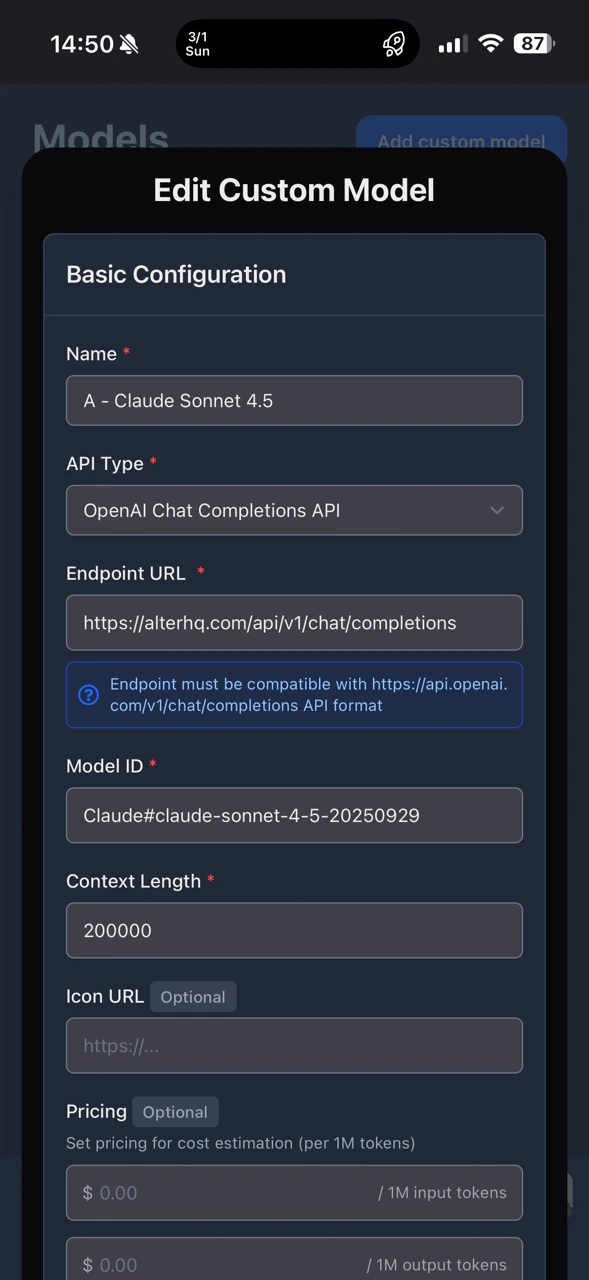
## 1)基础配置
按如下设置字段:
-`Name`:`Alter`
-`API Type`:`OpenAI Chat Completions API`
-`Endpoint URL`:`https://alterhq.com/api/v1/chat/completions`
* `Model ID`选择:从下方支持的ID中
* `Context Length`:默认值或您偏好的值
 ## 2)认证
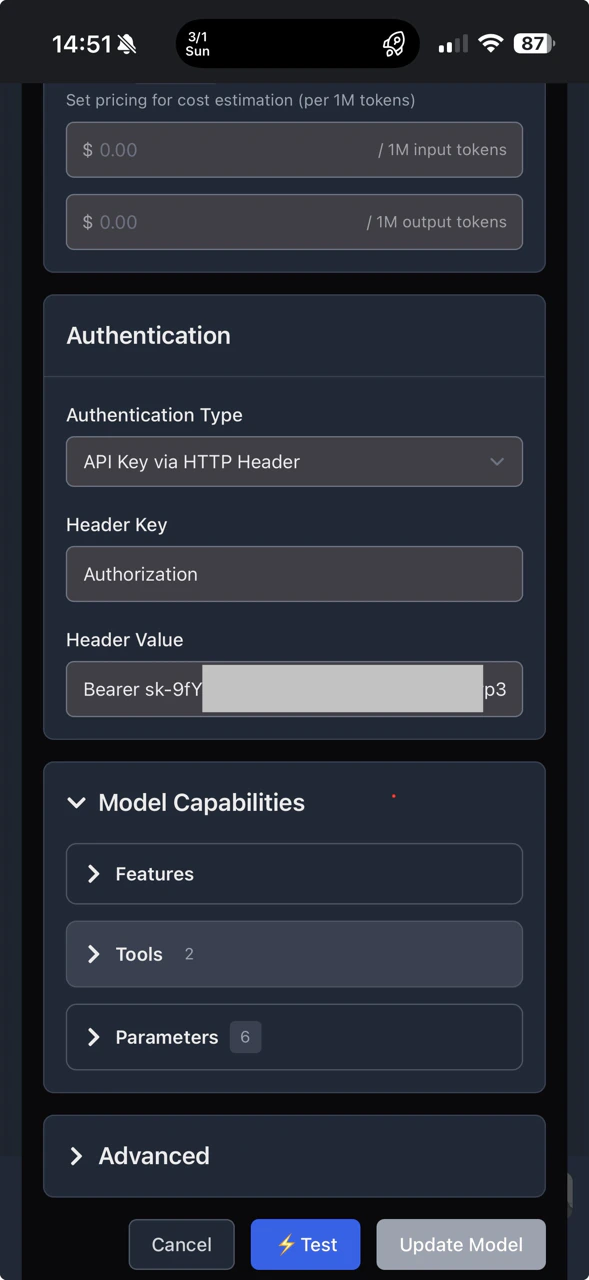
在认证区域:
-`Authentication Type`:`No authentication`
说明:我们将在下一步通过自定义标头手动创建 API 密钥。
## 3)高级配置(必需)
展开底部`Advanced`,然后添加一组自定义标题:
* `Key`(十字):`Authorization`
* `Value`(右侧):`Bearer `
将 `` 替换为真实的 Alter API key。
请确保`Bearer`和key之间有一个空格。
## 2)认证
在认证区域:
-`Authentication Type`:`No authentication`
说明:我们将在下一步通过自定义标头手动创建 API 密钥。
## 3)高级配置(必需)
展开底部`Advanced`,然后添加一组自定义标题:
* `Key`(十字):`Authorization`
* `Value`(右侧):`Bearer `
将 `` 替换为真实的 Alter API key。
请确保`Bearer`和key之间有一个空格。
 ## 支持的模型ID
请按原样复制`Model ID`。
### 克劳德(人类)
-`Claude#claude-3-5-sonnet-latest`
* `Claude#claude-3-7-sonnet-20250219`
-`Claude#claude-3-opus-20240229`
-`Claude#claude-3-haiku-20240307`
### 开放人工智能
-`OpenAI#gpt-4o`
-`OpenAI#gpt-4o-mini`
-`OpenAI#chatgpt-4o-latest`
-`OpenAI#gpt-4-turbo`
### 双子座(谷歌)
-`Gemini#gemini-2.0-flash-001`
-`Gemini#gemini-2.0-flash-lite-001`
-`Gemini#gemini-1.5-pro`
-`Gemini#gemini-1.5-flash`
### DeepSeek 及其他(由创建提供)
* `Together#deepseek-ai/DeepSeek-R1`
* `Together#deepseek-ai/DeepSeek-V3`
-`Groq#deepseek-r1-distill-llama-70b`
-`Perplexity#sonar-pro`
需要最新模型可用?请查看[API模型参考](/zh/references/api-model-names)。
## 支持的模型ID
请按原样复制`Model ID`。
### 克劳德(人类)
-`Claude#claude-3-5-sonnet-latest`
* `Claude#claude-3-7-sonnet-20250219`
-`Claude#claude-3-opus-20240229`
-`Claude#claude-3-haiku-20240307`
### 开放人工智能
-`OpenAI#gpt-4o`
-`OpenAI#gpt-4o-mini`
-`OpenAI#chatgpt-4o-latest`
-`OpenAI#gpt-4-turbo`
### 双子座(谷歌)
-`Gemini#gemini-2.0-flash-001`
-`Gemini#gemini-2.0-flash-lite-001`
-`Gemini#gemini-1.5-pro`
-`Gemini#gemini-1.5-flash`
### DeepSeek 及其他(由创建提供)
* `Together#deepseek-ai/DeepSeek-R1`
* `Together#deepseek-ai/DeepSeek-V3`
-`Groq#deepseek-r1-distill-llama-70b`
-`Perplexity#sonar-pro`
需要最新模型可用?请查看[API模型参考](/zh/references/api-model-names)。