> ## Documentation Index
> Fetch the complete documentation index at: https://docs.alterhq.com/llms.txt
> Use this file to discover all available pages before exploring further.
# DEVONthink
> Set up Alter as your AI provider in DEVONthink
[DEVONthink](https://www.devontechnologies.com/apps/devonthink) is a professional document and information manager for Mac and iOS. It stores your documents as data in easy-to-backup databases where you can structure, organize, and work with them. DEVONthink uses AI to see connections between documents, suggest categories, and assist in searching your databases.
This integration lets you use **Alter as your AI provider** in DEVONthink. It's available to anyone with an Alter subscription.
Alter provides an OpenAI-compatible API endpoint — learn more about [API pricing](/references/pricing-faq) and [available models](/references/api-model-names).
## What it supports
* AI-powered search and querying across your DEVONthink database
* Smart sorting and organization with AI
* Content summarization and extraction
* Integration with generative AI via OpenAI-compatible providers
## Setup Alter with DEVONthink
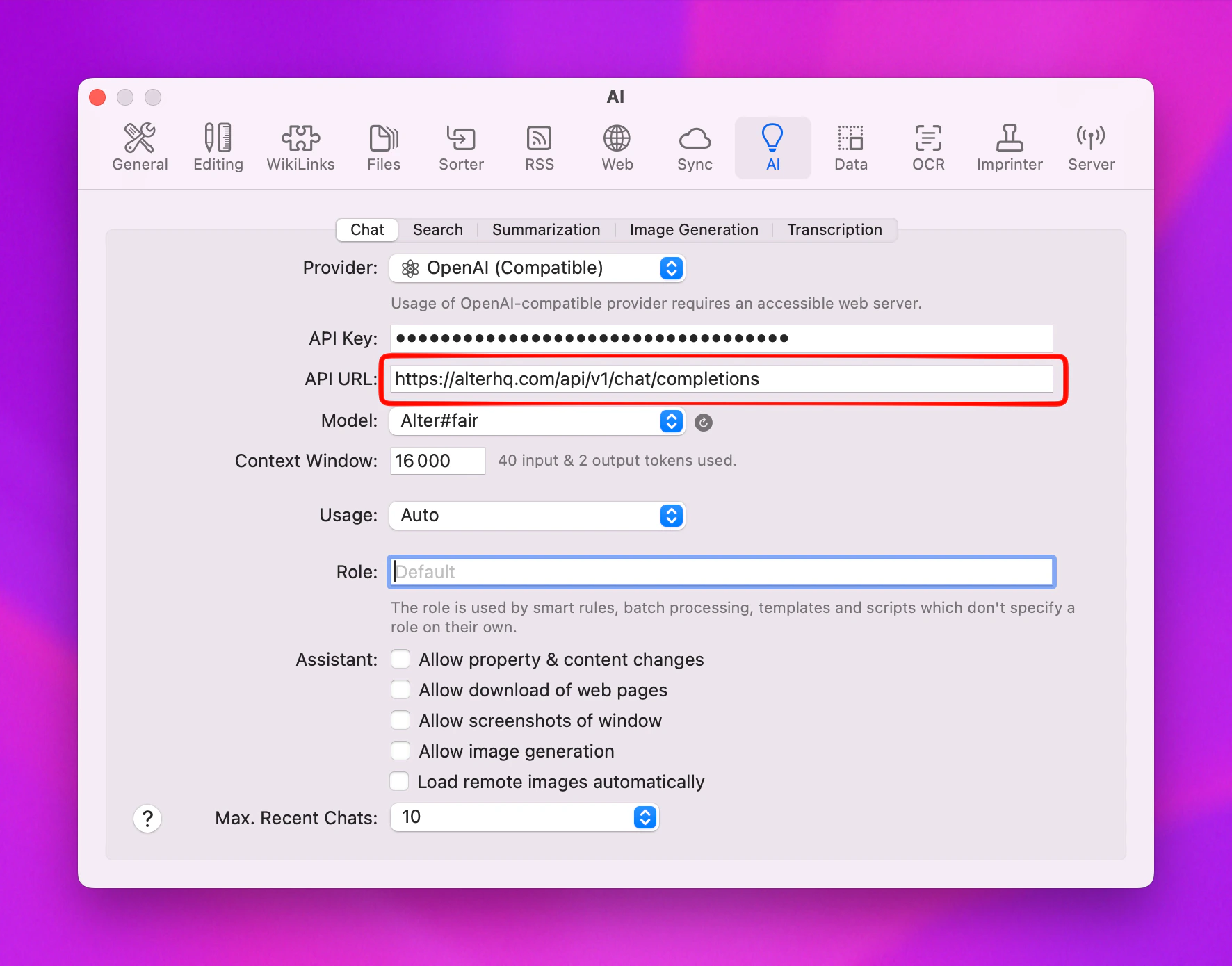
1. Open **DEVONthink** and go to **Settings**
2. Navigate to the **AI** tab
3. Under **Provider**, select **OpenAI Compatible**
4. Enter your Alter credentials:
* **API Key**: Your Alter API key
* **Endpoint**: `https://alterhq.com/api/v1/chat/completions`
5. Click the **Refresh** button to load available models
 ## Known issue
DEVONthink has a bug where the model list may not appear after clicking **Refresh**. If this happens:
1. Quit DEVONthink completely
2. Reopen DEVONthink
3. Go back to **Settings** > **AI**
4. The available Alter models should now appear in the list
## Recommended settings
After selecting your model, you can adjust the context window for better performance with longer documents. A max output tokens of **16,000 tokens** is recommended for most use cases.
## Learn more
* [DEVONthink AI documentation](https://www.devontechnologies.com/apps/devonthink/ai)
* [DEVONthink automation](https://www.devontechnologies.com/apps/devonthink/automation)
* [DEVONthink support](https://www.devontechnologies.com/support/support)
## Known issue
DEVONthink has a bug where the model list may not appear after clicking **Refresh**. If this happens:
1. Quit DEVONthink completely
2. Reopen DEVONthink
3. Go back to **Settings** > **AI**
4. The available Alter models should now appear in the list
## Recommended settings
After selecting your model, you can adjust the context window for better performance with longer documents. A max output tokens of **16,000 tokens** is recommended for most use cases.
## Learn more
* [DEVONthink AI documentation](https://www.devontechnologies.com/apps/devonthink/ai)
* [DEVONthink automation](https://www.devontechnologies.com/apps/devonthink/automation)
* [DEVONthink support](https://www.devontechnologies.com/support/support)